SnowRunner keeps on giving, despite developer Saber Interactive hard at work at the Expeditions successor, with another batch of paid-for downloadable content now available.
This time, with Season 11, we’re off to the wintry plains of Scandinavia, where a film crew needs help moving equipment around – presumably for a moody murder mystery.
In between working with the filmmakers, you can also help renovate the region and construct new observation posts before the upcoming winter season. This includes the creation of a cable car and camp sites.
Expect forests, snow-capped mountains and, at night, the Northern lights (aurora borealis). The area is made up of two new maps, both 4 km2.
There will also be two new vehicles, one truck and one off-roader:
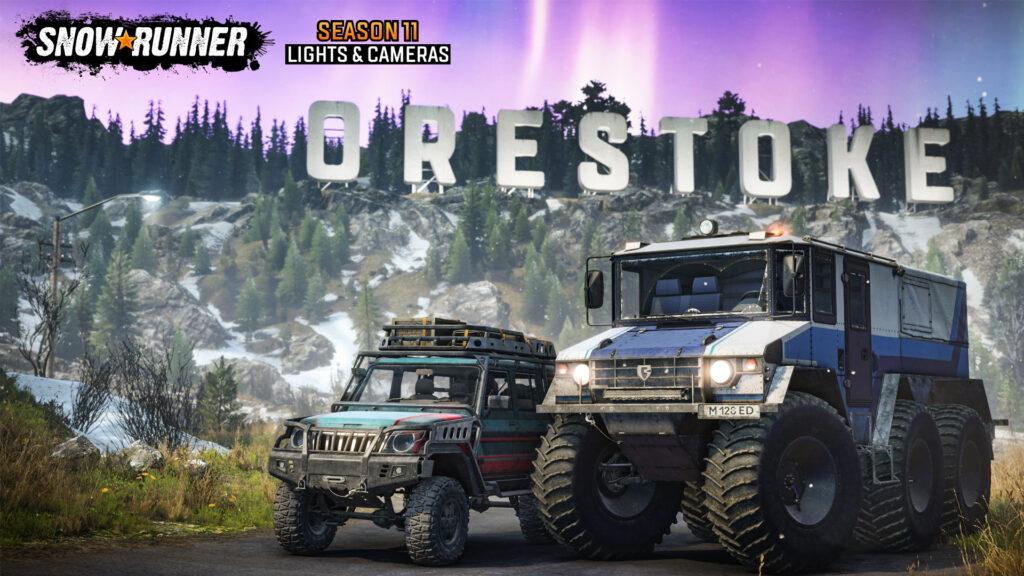
NEO Falcon 2000
Burlak 6×6
SnowRunner Season 11 – NEO Falcon 2000 (left) and Burlak 6×6 (right)
Alongside the paid DLC, there is a free game update (full changelog below) featuring new trailers, new cranes, new flat-beds and a set of 10 new stickers is also available for all players
SnowRunner Season 11, Lights & Cameras, is available right now for PlayStation 5, PlayStation 4, Xbox Series X|S, Xbox One, Nintendo Switch and PC for £5.79/$6.99/€6.99.
SnowRunner Season 11 changelog
New content:
[DLC] New region, Scandinavia – a region consisting of 2 new maps set in North Europe.
[DLC] New trucks:
Neo Falcon 2000
Burlak 6×6
[DLC] New addons and trailers:
Multi-purpose Cargo Module
Large Service Scout Trailer
Service Scout Trailer
Oil Field Flatbed (Kenworth)
Oil Field Flatbed (Consumables) (Kenworth)
British Columbia region fixes:
Fixed a bug where the lamppost lighting looked unnaturally near the bridge on the “Duncan Bay” level
Fixed a bug where landmark of the “Bridge” was missing on the map after completing the “Drilling Station Bridge” task of the “Duncan Bay” level
Fixed a bug where Scout Fuel Carrier from “Fuel for the law enforcement” contract was not removed upon completion
Fixed a bug where Service Hub locked behind “Second Garage Construction” was not actually locked
Fixed a bug where the delivery zone of the “Don’t drop it!” task was displayed on the power line tower to the south on the “Duncan Bay” level
Yukon region fixes:
Fixed a bug where “Crafting Zone” icons didn’t have black contour and blend into the background on the minimap in “Flooded Foothills” level
Fixed a bug where the “Fog of the War” was not dissipated on the minimap while moving on the “Flooded Foothills” level
Vehicles improvements:
Kenworth 963:
Fixed a bug where the headlights were too dim for some upgrades of the “Kenworth 963” truck
Fixed a bug where sometimes cabin of the “Kenworth 963” truck tilted to the left wheel while previewing the “LK-2NY” addon after entering the Garage
Added the ability to install a mini crane for a 3 slots platform on Kenworth 963
Removed snow from the cabins of Kenworth 963 when playing from 3rd person view
Other improvements:
Fixed a bug where snorkels’ textures were partially broken
Added the ability to attach trailers when using medium logs for ZikZ 612H “Mastodon”
Reduced crane weight of LK-2-NY crane
All Tatra trucks are now available for purchase in the new region
Fixed spawn trailers on ZiKZ 566A
Made changes to the lighting of cars: Land Rover Defender, Caterpillar CT681 and Rezvani
Fixed a bug where lighting without a light source was displayed on the “Crossbar Fog Lights” bumper for the “Kenworth 963” truck
Co-op:
Fixed a bug where the truck couldn’t be refueled from the addon or trailer in the coop session
Fixed a bug where in the pop-up window, users did not see each other’s trucks in the coop session and cannot refuel each other
Fixed a bug where the “Oil Barrels” cargo for “Flaming Barrels” contest didn’t appear for guests after accepting the contest on the “Island Lake” level, Michigan
Fixed a bug where the “Cement” cargo for “Cement Delivery” contest didn’t appear for guests after accepting the contest on the “Zimnegorsk” level, Taymyr
Other Changes:
Fixed a bug where was an incorrect crane reference distance winch points with trailers
Fixed a bug where the “locator” partially disappeared, when the lights were on at evening and night in “Cockpit Camera” mode
Fixed a bug where some parts of the active zones and markers disappeared in the cockpit mode with 8.30 p.m. to 7.00 a.m. when the headlights are turned on
Fixed a bug where the sun and moon rays had some unnatural blinking when passing through the trees on any level
Fixed a bug where the truck could be refueled from nothing when “Refuel” function was pressed beyond any fuel source refueling radius
Fixed a bug where the scout addons with the fuel canisters couldn’t be refilled by the “Fuel Tank” addon from another truck
Fixed a bug where the “Cloud save application error” message appeared after accepting the save transfer on the target platform, on PROS
Fixed a bug where after being constructed, the log bridge in the “Institute” map was not shown on the map
Fixed a bug where the shadows of the rocks and trees changed the position while moving camera near them in the evening and in the morning near the “Bridge to the Island” task zone area of the “Urska River” level, Amur
Fixed a bug where the tree shadows appeared in the “Garage” interior
Fixed a bug where the “Tuz Scout” was clipping into ground surface at the start of the “Wise Old Bird” contract on the “Burning Mill” level, “Tennessee”
Memory optimization
Different collision fixes
Different shadows fixes
Various visual fixes
Localization fixes
Mod editor:
The “Pack terrain for pc only” button was added (Generates a PC only paсk for tests)
Fixed a bug where the trailer didn’t freeze without indication of the Animation Name
Fixed a bug where the trailer became dynamic after loading the session
Fixed a bug where errors occurred when opening the “Addons” menu for the truck
“SnowRunner Editor Guide”:
Added info on FreezeTrailer feature, see “5.16.5. Freezing and Unfreezing Trailers”
Added info on usage of the same identifier of the truck/trailer in multiple truck delivery objectives and info on the new “Alternative restart zone” option, see “5.16.1.2. Delivery of the Truck (“truckDelivery” section)”
“Integration of Trucks and Addons” guide:
Chapter 20. Powered Constraints was added:
20.1. Powered Constraints: Overview
20.1.1. Main Principle
20.1.2. Main Aspects of Setup in XML
20.2. Actions. Their Mapping to Buttons (modified, previously named as “17.1.3. Actions. Buttons for Controlled Constraints”)
Descriptions of main tags and attributes related to Powered Constraints were added:
8.11. <PoweredConstraints>
8.11.1. <Chain>
8.11.2. <Group>
8.11.2.1. <Constraint>
14.7. <PoweredConstraints> (link to 8.11)
Sections 8.4.2.1. <Constraint> and 8.4.2.1.1. <Motor> were modified correspondingly
8.8. <GameData> was modified (added info about “NE” as a possible value of the Country attribute)








Discussion