BeamNG.drive v0.25 update adds new car and nearly 100 new missions
A huge new update has arrived for BeamNG.drive today, adding the new Civetta Scintilla supercar, nearly 100 new challenges, a revised garage plus countless other fixes and improvements.
The team behind BeamNG.drive has today (15th June 2022) released a gargantuan update to their eponymous physics-based driving game, updating the sim to v0.25.
Civetta Scintilla supercar
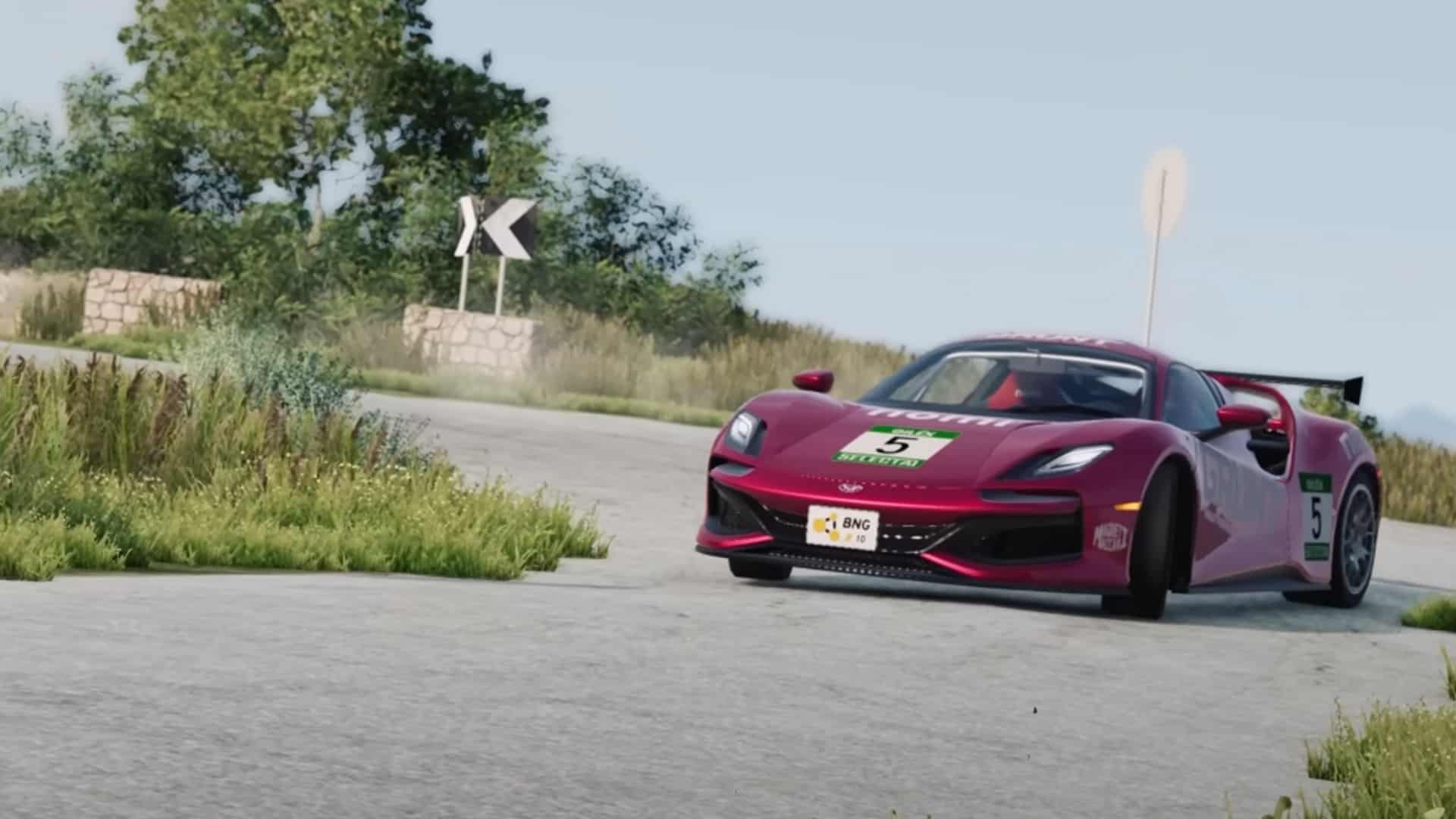
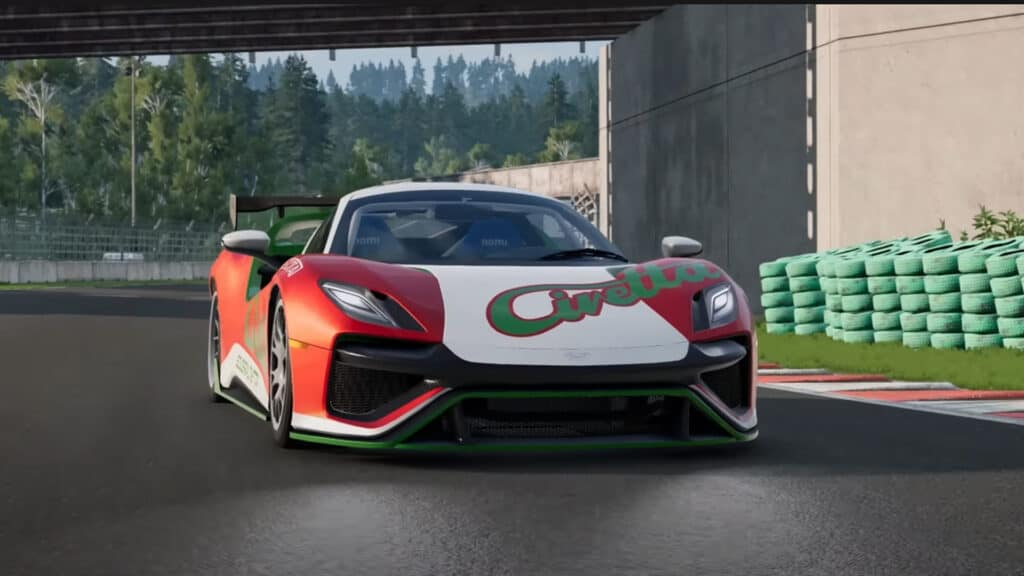
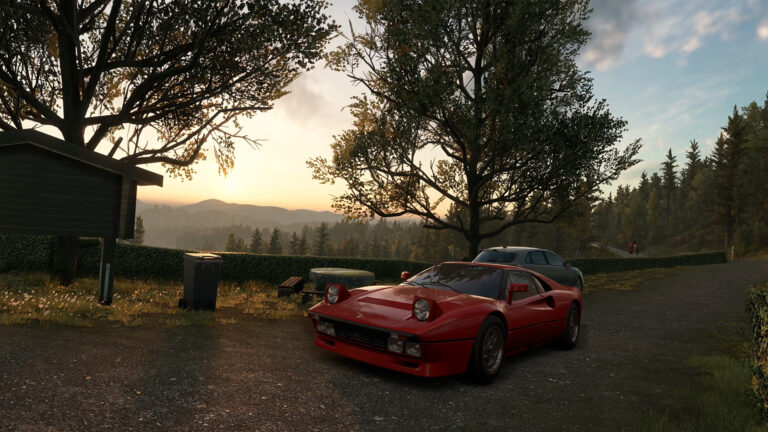
The headline feature of v0.25 is the addition of the Civetta Scintilla supercar. This V10, mid-engined monster features advanced stability control modes and active aero, as well as V8 engine variations – both petrol and diesel. Yeuch.
Somewhat akin to the Lamborghini Huracán and Audi R8, the car also features an automatic nose lift to help with those pesky speed bumps. Although part of the fun of BeamNG is hitting those speed bumps at high speed…
The Civetta also features police, rally, off-road, drag and race variants, which are sure to please all BeamNG users no matter their favoured driving style.
A deluge of new missions
The v0.25 update for BeamNG.drive also adds nearly 100 new missions to the game, including new Hypermiling, Crawl, Target Jump, Drag, Drift and Cannon mission types.
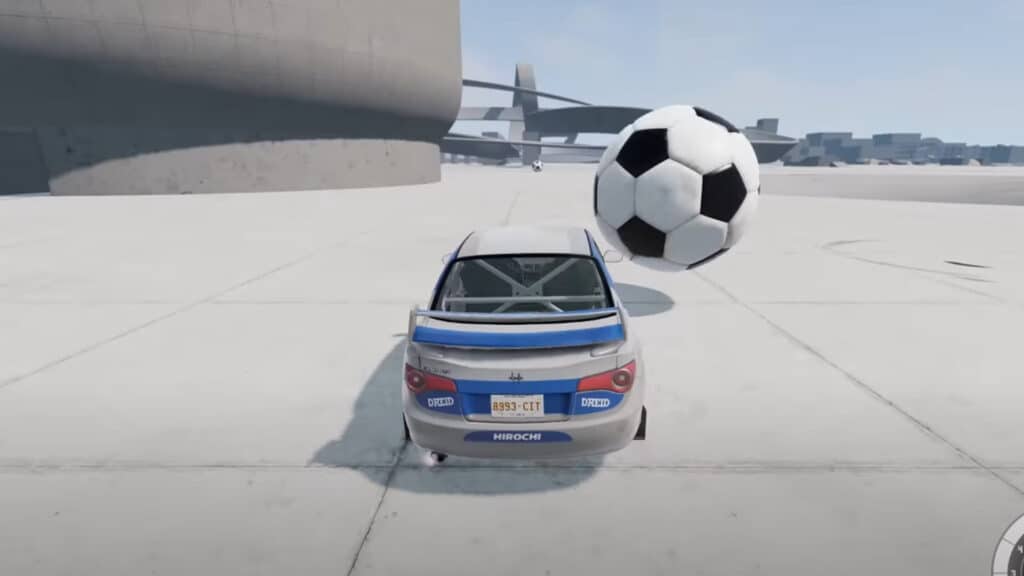
Yes, cannon missions. One involves taking down pigeons from a building’s roof. Why? Because BeamNG. Meanwhile, hypermiling is all about fuel-saving, analogous to those similar challenges in Gran Turismo 7, while Soccer Pit, yes that’s Soccer Pit, is a Beam take on Rocket League or Switch Sports Football.
The Driver Training campaign has also been absorbed by BeamNG’s mission system, with new challenges taking this part of the game up to 14 separate tests.
Garage mode returns
Garage Mode makes a return, with an updated User Interface helping make this area an ideal location for screenshots of your favourite cars – with or without their bodywork attached. Camera presets have been added alongside the ability to click through lighting for the vehicles and the garage environment.
The new update is expansive in its scope, with are gargantuan quantity of improvements and bug fixes.
Other notable additions include force feedback adjustments, carbon-ceramic brakes, traffic system upgrades, Steam Deck functionality fixes as well as vehicle updates to the Soliad Wendover, Hirochi SBR4, ETK 800-Series, ETK K-Series, Gavril H-Series, Cherrier FCV and Bruckell Bastion.
Fixed texture stretch on sine suspension test mesh
Fixed tile z-fighting
Hirochi Raceway
Improved terrain colors and settings
Improved and updated to PBR backdrop material
Improved transition between terrain and backdrop
Improved grass groundcover colors matching with terrain colors
Fixed an intangible tire wall
Industrial Site
Enabled gated road for race tracks
Italy
Fixed some incorrect objects position
Fixed airport building collision
Jungle Rock Island
Improved beach grass
Fixed some foliage positions
Fixed floating rocks
West Coast, USA
Fixed collision mesh on inner city park fence
Fixed decalroads transition
Fixed some misplaced collision meshes
Fixed some floating trees
Fixed toll LOD issue
Fixed a tree growing through a roof
Fixed a hole in the ground in the city
Common
Updated decals on roads and terrain to PBR in all maps but Italy, West Coast and Automation
Updated rocks textures to PBR in all maps but Automation
Updated dirt decalroads in all maps but Automation, Italy and West Coast
Fixed skylight shadow value in Industrial, Jungle rock island and Utah
Fixed rivers issues in Italy, Jungle rock, Utah and East Coast
Missions
New Mission Types
New AI Race Mission Type:
Race against AI cars with your own or a provided car
10 new Missions are available across East Coast USA, West Coast USA, Italy and Utah: The One to Beat, Speed Sense, Street Tour, Scenic Coast, Dam Crossing, Ridge Race, Highway Battle, Wild West Trails, West Coast Circuit 1, Highway Loop
New Cannon Mission Type:
Destroy targets with the old cannon
6 new Missions are available across Small Island, Italy, West Coast USA, East Coast USA: Stop the bus!, Rooftop Shooting, A Break, Delivery Destruction, Pigeons on the Roof, A Flock Of Pigeons
New Crawl Mission Type:
Crawl through difficult terrain without a time limit
You can recover back to some checkpoints you reached without having to restart the whole mission
7 new Missions are available across East Coast USA, Hirochi Raceway, Italy, Small Island and Utah: River Crawl, Hirochi Crawl, Beach Crawling, Cave Crawling, Short Cliff Crawl, Dried River Crawl, Long Crawl
New Garage to Garage Delivery Mission Type:
The original scenario now available as a mission on various levels
Deliver Cars from one place of the map to another
Multiple versions of the mission which will only use a subset of vehicles or locations (For example, only sport cars)
13 new Missions are available across East Coast USA, Italy, Jungle Rock Island and Utah
New Hypermiling Mission Type:
Drive as far as you can with very limited amount of fuel
9 new Missions are available across East Coast USA, Industrial, Italy, Jungle Rock Island, Utah and West Coast USA
Knockaway Mission Type:
The original scenario now available as a mission on various levels and configurations
Knock away a number of targets within a time limit to gain the most points
7 new Missions are available across East Coast USA, Gridmap V2, Industrial and Utah: Barrel Hunter: Farm House, Forest and Sawmill, Knockaway: Barrels, Suspension Test and Blocked Road
A Run for Life:
Drive as far as possible while staying within the camera and avoiding obstacles
Available on Gridmap V2
Target Jump Mission Type
Get the highest score by crashlanding in specific areas
Available on Utah
Updates for existing Mission Types:
Delivery Mission Type
3 new Missions are available across Gridmap V2 and Italy: Soccer Pit 1 and 2, Scintilla Delivery
Cargo vehicles are now turned off by default
Drift Mission Type:
3 new Missions are available across ETK Driver Experience Center and Italy: Gymkhana Basics, Basic Gymkhana
1 new Mission is available on Italy
Drag Mission Type:
Re-added the old lapping-system from the previous version
Improved start-line detection
Fixed the disqualification screen
Campaigns
Driver Training Campaign:
This campaign has been ported to the mission system, with several updated and added missions, resulting in 14 missions in total
Missions can be unlocked in a non-linear way
Mission System General
Added Progression System:
Mission-specific stats like scores, times, distances, etc., will be saved on a per-attempt basis
Best results are visible on the Map View when selecting a mission, and also on the mission start and end screens.
Which and how stats should be saved is completely moddable and can be set up on a per-mission-basis
Supports multiple leaderboards per mission based on mission configuration (amount of laps, type of vehicle etc.)
Mission Editor:
Can now show previews by default instead of hovering
Can now check for missing mission type values automatically
Fixed issues with bus stops and pathfinding for some Bus Mode missions
Several minor bug fixes
Driving & Safety Electronics
Added various new control schemes
AWD control (Manipulates the AWD system in order to better manage various driving scenarios)
Diff control (Adjusts diff locking and similar behaviors for improved and less intrusive yaw control)
Aero control (Uses active aero elements to battle oversteer)
Added checks for rollover and post-crash scenarios for use with other systems
Implemented more finely grained electronics activity tracking
Improved wheelslip calculation when wheels are turning in a different direction than the vehicle is moving
Revamped how DSE debug modes are enabled to improve performance
Limited acceleration noise calculation to sane values
Significantly reduced cost of running multiple cars with DSE
Fixed a case where TCS could fight with ESC for brake use
Fixed an issue where the secondary side of the electronic splitshaft could backdrive the secondary side when not desired
Fixed an issue where a purely brake-based traction control wouldn’t work correctly
Fixed CMU reset not working correctly in some circumstances
Fixed external & drivemode PID parameters not being applied correctly
Fixed PIDs not being reset correctly under certain circumstances
Input and Force Feedback
Added a new oversteer reduction assistant (enabled by default in Options > Gameplay > Assistant). It helps gamepad/keyboard users with some amount of automatic countersteering, to help stabilize the vehicle when slidinghttps://player.vimeo.com/video/720523832?badge=0&autopause=0&playsinline=true&color=#f60&dnt=1
Improved force feedback quality and response latency (by switching signal filtering from an exponential smoother, to the new “exponentialSmoothingT” filter)
Added default layout for PS5 controllers
Improved various default buttons and filters for PS4 controllers
Improved and optimized UI navigation on a gamepad:
Added directional-pad binding hint on the bottom bar
Improved Back button behavior (UI button, keyboard Esc or gamepad (B))
Improved navigation for the Vehicle Selector, Level Selector and Spawn Point Selector screens
Fixed pre-focused element behavior, an element can now be activated by pressing (A)
Fixed vehicle selector filters
Fixed scroll – scrollable areas now scroll with selection
Added new variant of 1:1 steering matching, and revamped its options UI. For information on how each mode behaves, use the mouse to hover over them
Added ability to customize the Force Feedback strength when using the “Soft Lock Force” feature. Improves its usability on powerful direct drive steering wheels.
Revamped and moved the Options > Controls > Filters tab to Options > Gameplay
Any steering assistant will now only apply to gamepads and keyboards, ensuring steering wheel input stays as transparent as possible
Fixed inputs sometimes being smoothed even after selecting a 1:1 steering option (to be used only with steering wheels)
Improved the Options > Gameplay > Driving Assistants > “Reduce steering at high speed”, by allowing full-lock countersteering at any time. This eliminates the biggest tradeof that this assistant used to suffer.
Added ability for modders to ship new default bindings, both game-wide and vehicle-specific. This means that mods can now work straight out of the box without your users needing to bind keys manually. If you are a modder, take a look at settings/inputmaps/keyboard*.json for a live example of game-wide bindings, and at vehicles/pickup/inputmaps/keyboard*.json for a live example of vehicle-specific bindings. Since it’s an early implementation, you can help us by letting us know if you find any issue!
Added ctrl+shift+F binding to open the Performance Graph menu (this key combination used to cycle the metrics panel in reverse direction)
Fixed SpeedLink Phantom Hawk Flight stick using a slower, smoothed gamepad filter (rather than faster unfiltered inputs)
Fixed some old PlayStation gamepad adapters having twitchy controls (rather than smoother inputs)
Fixed the F1 key not opening the Help menu anymore
Improved readability of log generated when an input controller emits too many events at once
Gameplay
Added several new functions accessible through bindings:
ctrl+shift+D – ‘Change time of day’: will cycle between day, night and sunrise
ctrl+shift+T – ‘Toggle traffic’: will activate it (like “Normal traffic” in radial menu), or deactivate traffic (the cars will remain in memory, ready to be instantly activated again)
ctrl+shift+I – ‘Toggle autonomous driving’: instructs an AI to take over behaving like a traffic car, or halts so you can gain manual control again.
ctrl+shift+H – ‘Deflate random tire’: will puncture a random tire of the car (press several times to damage the rest of wheels)
Added support for exiting left-hand drive vehicles through the right-hand door when using walking mode with ‘F’ key (for example, in the bus), thanks to a new jbeam flag named “rightHandDoor”
Added new style to the 3D Track Builder, ‘racetrack’, featuring flat curbs followed by a runoff area and finally a wall
Improved the Field Run scenario by immediately losing when you fall too far behind the chased vehicle
Cleaned up unnecessary logs when entering the 3D Track Builder
Powertrain
Added support for carbon-ceramic brakes
Improved DCT engine overrev protection
Starter and shutoff sounds now use the engine’s main_gain values
Tire burst sounds now take static and dynamic tire properties into consideration
Adjusted gearbox shift aggression math
Supercharger whine now has an additional RPM component for off-load whine
Clamped maximum reported boost pressure to maximum deliverable for a given turbo
Fixed an issue where DCTs could get stuck during revmatching
Fixed wheels without brakes showing up in the brake thermals debug after breaking off
Fixed an issue where an exception was thrown with older mods when a wheel broke off
Fixed an issue where combustion engines were using incorrect nodes for spawning particles
Fixed NOS not working correctly with CVT transmissions
Drive Modes
Fixed global yaw/traction control settings overriding more finely grained settings when not desired
Fixed issue where sometimes default settings weren’t taken into account correctly
Controllers
Added sound support for nitrous purging
Added tire data module to generic gauges
Added “Axle Lift” controller for very low cars
Added controller for pyrotechnic charges
Implemented better unit support for generic gauges
Implemented AVAS support for electrics vehicles
Improved UI support for twin-charge systems
Improved lightbar controller configurability
Improved sound control of pneumatic systems
Improved switch between D/S and M modes on DCT
Post crash brake controller now also takes acceleration in the Z axis into account
Exposed some kickplate properties and events via electrics
Fixed some timing constants not applying to electric vehicles
Fixed a bug where the two-step limiter could remain active outside its operational limits
Fixed generic gauge remaining range calculation for ICE vehicles
Fixed range calculation not taking fuel type into account
Fixed DCT M mode being displayed incorrectly in arcade behavior
Fixed an issue where configuring the generic gauges didn’t work correctly with multiple parts
Fixed DCT being stuck in current gear after using M mode
Fixed Adaptive Brake Lights not working correctly together with Post CrashBrake under some circumstances
Fixed bug with “electrics.values.running” being true even though engine was turned off with transmission/gearbox removed
Physics
Added ability to toggle individual couplers from code
Added sideSlip attribute to wheels. It tracks how much the wheels slip laterally
Added skinDragCoef parameter that controls the aerodynamic skin drag of triangles
Added beamDampVelocitySplitRebound property to bounded beams. It allows to control the rebound velocity split of suspensions
Added support for returning the internal stress of bounded beams to obj:getBeamStress core function
Added obj:getSmoothRefVelocityXYZ function. It returns the velocity of the reference node with reduced noise
Improved the quality of the static collision acceleration structures by ~25%
Reduced the memory size of the static collision acceleration structures by 25%
Fixed an issue with breaking couplers via breakgroups
Fixed anisotropic beams retaining their damping behavior even after breaking
Traffic
Rewrote most of the traffic system; traffic vehicles can now have distinct roles, with support for custom roles & flowgraph roles
Implemented roles: standard, police, suspect, service
All traffic vehicles now track their own driving & pursuit data; this means that police can automatically pull over or chase other vehicles in the traffic system, as well as other interactions
Traffic vehicles get a small forwards boost after respawning (except for vehicles with a trailer)
Changed traffic settings in the Options
Prevented trailers from having physics instability errors when attached to vehicles in traffic
Fixed precision of starting positions of vehicles spawned with the Multi-Spawn system
Fixed strange traffic vehicle behavior that could happen sometimes if the player had damage or a collision
Fixed and improved police roadblocks
AI
Added the ability for AI vehicles to handle dynamic navigraph road drivability changes
Added a few new detailed parameters
Implemented several AI navigraph improvements on East Coast, USA
Improved chase mode logic; vehicles will attempt to stop and turn around smoothly if their target is behind them
AI vehicles will turn on engine if not already when set to an active mode
Optimized AI traffic mode planning distance
Reduced plan line instability by using a lower limit for the plan deviation step distance
Tweaked awareness coefficient calculation
Vehicle lane positioning calculation bug fix
Fixed an issue with unintended lane change at intersections between one-way and two-way roads
Fixed the AI being affected by the “Reduce steering at high speed” gameplay setting, which was limiting its cornering skills
Script AI
Fixed a bug whereby upon replay the vehicle would not reset with the correct position/rotation when timeOffset was set to zero.
Game Engine
Added native Linux binaries in BinLinux (experimental) using the new Vulkan render backend
Unified BeamNG.drive and BeamNG.tech. You can now dynamically switch to .tech if you have the license
Improved some cases where the spawn position search would spawn the vehicle inside a static object
GLTF exporter:
Improved 3D mesh exporter:
Fixed cars with no props/flexbodies, embedding textures inside of the .glb directly
Fixed crash on missing jbeam data
Fixed missing PBR export data, making it more error resilient, added CEF texture dumping, resulting in the license plates working
Fixed invalid file being produce if vehicle have missing meshes
The F7 teleport now turns the vehicle to where the camera is pointing (added another input action using the old behavior)
Tweaked Gizmo Plane Size and Color Addons
Improved GameEngine standard input/output pipe to be more compatible with automated scripts
Improved external UI support: added execCtxWebId to requests that originate from web clients
Improved instanced line renderer: faster, less corner cases, added optional caps, see example at lua/ge/extensions/util/instancedLineRenderDemo.lua
Added debugDrawer:drawDot
Cleaned up c++ backend of the camera system
Fixed hookprotector not working, prevents known third party DLLs to inject broken code and crashing the game
Fixed groundmodel mixed up on static meshes
Fixed Mod manager glitches files while packing mods
Fixed the simulation entering 1/100x slow motion mode when reloading Lua with ctrl+L while the game is paused
Fixed water waves never rendering their real, full vertical amplitude (especially when camera is located close)
Fixed zip64 not working
Deprecated last remaining T3D connection code
Various performance improvements
Audio
Added pedestrian warning sounds for electric vehicles
Added sounds for nitrous oxide injection (“purging”)https://player.vimeo.com/video/720524305?badge=0&autopause=0&playsinline=true&color=#f60&dnt=1
Added sounds for disconnecting wing doors
Added additional volume sliders in game audio options
Added missing afterFireMufflingCoef and exhaustAudioMufflingCoef to many engine jbeam files
Added new turbo spindle events >Vehicle>Forced_Induction>Turbo>Spin – turbo_spin_07 ‘to’ turbo_spin_15 and turbo_spin_powerwhistle_01
Improved stereo separation of tire audio in 1st person cameras
Improved vehicle collision sounds and triggering
Improved pitch stepping on high pitch range sounds (supercharger whine, turbo whine and transmission whine)
Improved starter and shutoff sounds – Cleanup of assets; volume now follows main_gain control from engines
Improved scrape sounds – Minimized jitter and unwanted cutting of sounds; EQ and volume adjustments; Added metal squeal one-shots
All rigid surface rolls (not loose ones) now have tire hum
Rigid and loose surface rolls now have more consistent underlying audio between different types
More dynamic sound for flat tire and tire burst by incorporating downforce, air pressure and size of tire
Revised turbo spindle and hiss volume scale, to allow for more overall headroom
Exhaust and afterfire min/max distances now automated based on exhaustAudioMufflingCoef and afterFireMufflingCoef, rather than mixing separate fixed spacialiser DSP effects
Fixed unwanted re-triggering of bus doors
Fixed asphalt tire hum pitch clamp
Fixed cockpit audio filter not working correctly at high speeds and/or low framerates
Fixed certain sound effects incorrectly muting and unmuting at a fast rate when using extreme slow motion in fast computers
Fixed engine sounds popping the further away the vehicle gets from the camera
Fixed a problem with some i4 DCT vehicles not playing afterfire on gear changes
Fix for surface roll volume when performing stationary wheelspins
Minor optimizations to code related to the cockpit audio filtering
Various generic mix tweaks
UI
NEW: Garage mode
Implemented dedicated UI for Garage mode
Implemented several Garage options (just lighting for now)
Implemented several Vehicle feature controls
Integrated Vehicle tuning into the Garage mode
Map Overview mode:
Improved camera path during transition
Categorized POI (points of interest) list with filters
Filter by type above POI list
Filter by map point, if point of the map contains multiple missions
Mission details with previews and basic progression stats
UI Apps:
Revamped the G-Forces UI app for better readability, with a new color scheme, and displaying the maximum longitudinal and lateral forces reached in the last few seconds
Revamped the ‘Steering’ UI app: now using a new color scheme, different proportions, showing the amount of force feedback (if using a steering wheel), white dot indicators for each selected steering assistant, and a new horizontal bar showing how much assistance is kicking in at any moment, plus optimizations and bugfixes
Reworked TorqueCurve app
New icons for Carbon-ceramic brakes on Simple Brake Thermals apps
UI apps no longer appear broken after loading level or other events that hide/reveal UI apps
Fixed “Simple Trip App” counting distance while the game is paused
Traffic app now uses traffic options to randomly select vehicles
Fixed UI app search feature issues
Fixed the Force Feedback UI app continuing to scroll while the simulation or replay is paused
Improved vehicle parts configuration:
Search field will no longer prevent gamepad users from going further below the list
Parts are now highlighted with gamepad
Fixed selector highlighting
Improved vehicle tuning:
Tuning now behaves correctly when switching between spawned vehicles
Implemented various minor fixes and optimizations
Improved game options:
Fixed Options > Help > Performance having a link to ‘Open performance graph’ in the GPU section, rather than being located in the first section
Fixed the Options > Controls > Force Feedback > Response Correction Curve having a white-on-white help message when hovering over with mouse since the UI theme was converted to dark mode
Fixed Options > Controls > Bindings menu displaying the same binding multiple times if several identical controllers are currently plugged to the computer
Fixed several Options > Controls > Force Feedback tooltips hovering out of view, making them unreadable
Fixed a typo in Options > Help menu
Cleaned up options menus
Revamped the ctrl+F metrics panel: added a minimalistic preset, added a Performance Graph hint, cleaned up old unused statistics, and ported from old T3D TorqueScript code and UI, to either ImGui (during normal gameplay) or to DebugDrawer (when UI is hidden for optimization/development purposes)
Added CEF UI rendering framerate to Performance Graph menu, and split normal framerate into the 3 types we use: dtReal, dtSim, dtRaw. Framerates panel will now be shown by default
Added new search keywords “fov” and “field of view” to easier locate camera zoom keys in the Options > Controls > Bindings menu
Made several changes to mission icons to make them less intrusive
Mission icons will be hidden when a static object is in the way
Fixed Performance Graph menu attributing too much time to the ‘UIupdate’ section
Fixed blurry sections of screen in some situations (including thumbnail generator for custom vehicle configs)
Fixed nothing appearing on screen when an unassigned binding was meant to be shown; now an empty rectangle will be displayed instead
Fixed the tab left/right hints displaying even when there was no more tabs to navigate to
Fixed error when the current UI layout contains no UI apps at all
Fixed UI errors when polling streams data shortly after spawning vehicles
Fixed UI running at half the target FPS, all UI animation and Digital car gauge should be smoother
Improved Color Picker markup and styling for the Garage mode and Freeroam
Updated official translations
Improved game credits
Credits now play smoothly, at a constant speed
Updated information in the game credits
Steam Deck
Added automated detection of Steam Deck, this will set correct default options
Added support for virtual on-screen keyboard for Steam/Steam Deck
Added global variable runningOnSteamDeck to detect if the game is running on Steam Deck
Camera
Minor usability improvements for the Options > Camera menu list
Changed auto centering camera to only auto-center when vehicle is moving
Fixed ‘external’ camera not finding a new location when the vehicle is reset back to a far away position
Fixed ‘orbit’ camera sometimes having unwanted sudden movements
Fixed ‘external’ camera not being able to properly deal with ultrasonic vehicles
Optimized memory use of camera code (leading to slightly decreased stuttering)
Replay
Fixed replay not being able to open a file recorded at different map than the current one
Fixed metallic car paint not being properly recorded
Fixed infinite ‘Loading’ screen when attempting to load a map that no longer exists (such as opening a replay from a mod map that is currently disabled)
World Editor
Added options to change gizmo plane size and colors
Added toggle draw gizmo plane shortcut
Added World/Local Coordinates toggle info
Audio Engine Debug: Changed type and limits of some UI sliders
Decal Road Editor: Added separate options for making AI roads and non-AI roads selectable
Forest Editor:
Fixed issue where forest brushes could get deleted by accident
Fixed placement of forest items in combination with the “snap to terrain” option
Tidied up Forest Editor Brush Group Elements and Mesh Order Alphabetically
ShapeEditor: added highlight of material when hovering the name in the list
River Editor:
Improved selection rendering for rivers for better clarity and performance
River now gets reloaded when changing the segment length
Renamed “Multi-Vehicle Spawner” tool to “Vehicle Groups Manager”
Fixed SetObjectField node to properly set the values of a tuple (e.g. vec3) field that was originally setting the 2nd and 3rd values to zero
Fixed draw gizmo plane option not working
Fixed vehicle selection issues and improved functionality in Vehicle Groups Manager
Fixed and improved Traffic Debug tool
Fixed issue where decal road names weren’t being updated in the scenetree after changing the material
Fixed undo/redo when creating a new SimGroup
Fixed “move camera to selection” when nothing is selected
Fixed broken beamType Beam Visualization Mode App
When creating a prefab out of objects in the scenetree, put the prefab in the same group
Hide object icons in edit modes where they are not needed
Various UI fixes and improvements
Flowgraph
Added Garbage Debugging Window: this tool can help modders optimize the memory use of their flowgraphs, decreasing potential framerate stutters
Upgraded race related nodes and modules to fully support creation of races with multiple vehicles
Updated and created traffic nodes to use new data from the traffic system upgrade
Added feature for traffic vehicles to run their own role logic in a flowgraph
Rendering
Added new render view system that will allow for multiple viewports in the future (EXPERIMENTAL)
Added ability to disable main viewport rendering: getRenderWorldMain/setRenderWorldMain
Fixed grass generation performance issues
Lua
Vehicle Lua
Added thrusters.applyAccel and thrusters.applyVelocity functions. They can accelerate or speed up a vehicle to a certain speed
Added sigmoid and bumpFun functions to mathlib
Changed initialization of exponentialSmoothing to make it adapt to different base physics rates
Added csvlib Lua library. It provides helpers for high performance recording and writing of comma/tab separated (CSV/TSV) files
Added new exponentialSmoothingT filter to filters.lua, it’s a filter based on exponential smoothing but with less lag than exponential smoothing
Added Lua function to convert a file to .dds: convertToDDS(imageFilename, ddsFilename)



Discussion