





In the most recent update for 2021’s release of Forza Horizon 5, alongside their second expansion with the Rally Adventure DLC, there are some new things for all players to enjoy and partake in.
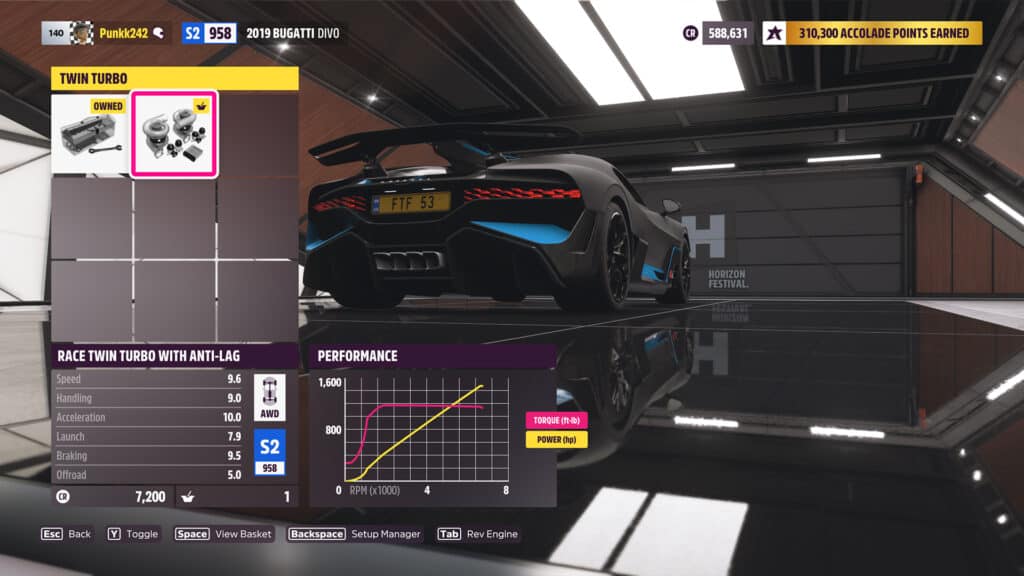
One of the new features available to all players, regardless if they have the Rally Adventure expansion, is the addition of an Anti-Lag system that can be added to many of the cars in the title.
However, it’s not something that’s available for every car, only ones that can be turbocharged with a turbo system. On top of that, it’s a separate part than the previous turbos that may exist on the cars before the additions.

Long story short, it won’t inherently be on your cars from the get go. It is its own add-on part. For turbocharged cars or those with the ability to add a turbo, which reportedly is over 630 cars in Forza Horizon 5 already, players can add this new Anti-Lag system.
HOW TO ADD ANTI-LAG
To add an Anti-Lag system to your car, you’ll need to first head to the Cars menu on the pause screen, then move over to the Garage tab.
Pick the car you want to add the Anti-Lag turbocharger to and get in the car. Then, click on Upgrades and Tuning. The big section in the middle of the screen says Custom Upgrade – go ahead and click on that, and head to the Engine section. Find the Turbo options, click to get in there, and then the part should appear.



Discussion